Google Cloud
Google Cloud offers a number of robust text-to-speech voice models. SignalWire supports all Google Cloud voices in both General Availability and Preview launch stages, except for the Studio model.
Models
Google Cloud offers multiple TTS model types with varying quality and pricing:
| Model Type | Description |
|---|---|
Standard | Basic, budget-friendly TTS model |
WaveNet | Deep learning-based, natural and lifelike speech |
Neural2 | Advanced model with human-like pronunciation |
Polyglot | Multi-language variants of specific voices |
The model type is encoded in the voice name (e.g., en-US-Neural2-A, es-ES-Wavenet-B).
- Standard is a basic, reliable, and budget-friendly text-to-speech model. The Standard model is less natural-sounding than WaveNet and Neural2, but more cost-effective.
- WaveNet is powered by deep learning technology and offers more natural and lifelike speech output.
- Neural2 is based on the same technology used to create Custom Voices and prioritizes natural and human-like pronunciation and intonation.
- Polyglot
voices have variants in multiple languages. For example, at time of writing,
the
polyglot-1voice has variants for English (Australia), English (US), French, German, Spanish (Spain), and Spanish (US).
Billing
Google Cloud TTS usage on SignalWire is billed according to the following SKU codes:
| Billing SKU | Models | Description |
|---|---|---|
gcloud | Standard, WaveNet | Traditional and WaveNet model billing |
gcloud_cog | Neural2, Polyglot | Cognitive services (Neural2) model billing |
The billing SKU is automatically determined by the voice model type. Neural2 and Polyglot voices use the gcloud_cog SKU, while Standard and WaveNet voices use the gcloud SKU.
Consult the Voice API Pricing page for current rates.
Usage
Copy the voice ID in whole from the Voice name column of Google's table of
supported voices.
Google Cloud voice IDs encode language and model information,
so no modification is needed to make these selections.
Prepend gcloud. and the string is ready for use.
For example: gcloud.en-GB-Wavenet-A
Google Cloud voice IDs conform to the following format:
gcloud.<voice>
Where <voice> is the complete voice name from Google's supported voices table.
Voice name pattern:
Google Cloud voice names follow: <language>-<model>-<variant>
language: Language code (e.g.,en-US,es-ES,ja-JP)model: Model type (e.g.,Standard,Wavenet,Neural2,Polyglot)variant: Voice variant letter (e.g.,A,B,C)
Examples:
gcloud.en-US-Neural2-A
gcloud.en-GB-Wavenet-B
gcloud.es-ES-Neural2-A
gcloud.ja-JP-Neural2-B
gcloud.fr-FR-Wavenet-C
gcloud.de-DE-Standard-A
gcloud.en-US-Polyglot-1
Case insensitivity:
Voice IDs are case-insensitive. These are equivalent:
gcloud.en-US-Neural2-A
gcloud.en-us-neural2-a
Note: Google Cloud voice IDs already encode language and model information.
Languages
Sample all available voices with Google's supported voices and languages reference. Copy the voice identifier string in whole from the Voice name column.
Unlike the other supported engines, Google Cloud voice identifier strings include both voice and language keys,
following the pattern <language>-<model>-<variant>.
For example:
- English (UK) WaveNet female voice:
en-GB-Wavenet-A - Spanish (Spain) Neural2 male voice:
es-ES-Neural2-B - Mandarin Chinese Standard female voice:
cmn-CN-Standard-D
Examples
Learn how to use Google Cloud voices on the SignalWire platform.
- SWML
- RELAY Realtime SDK
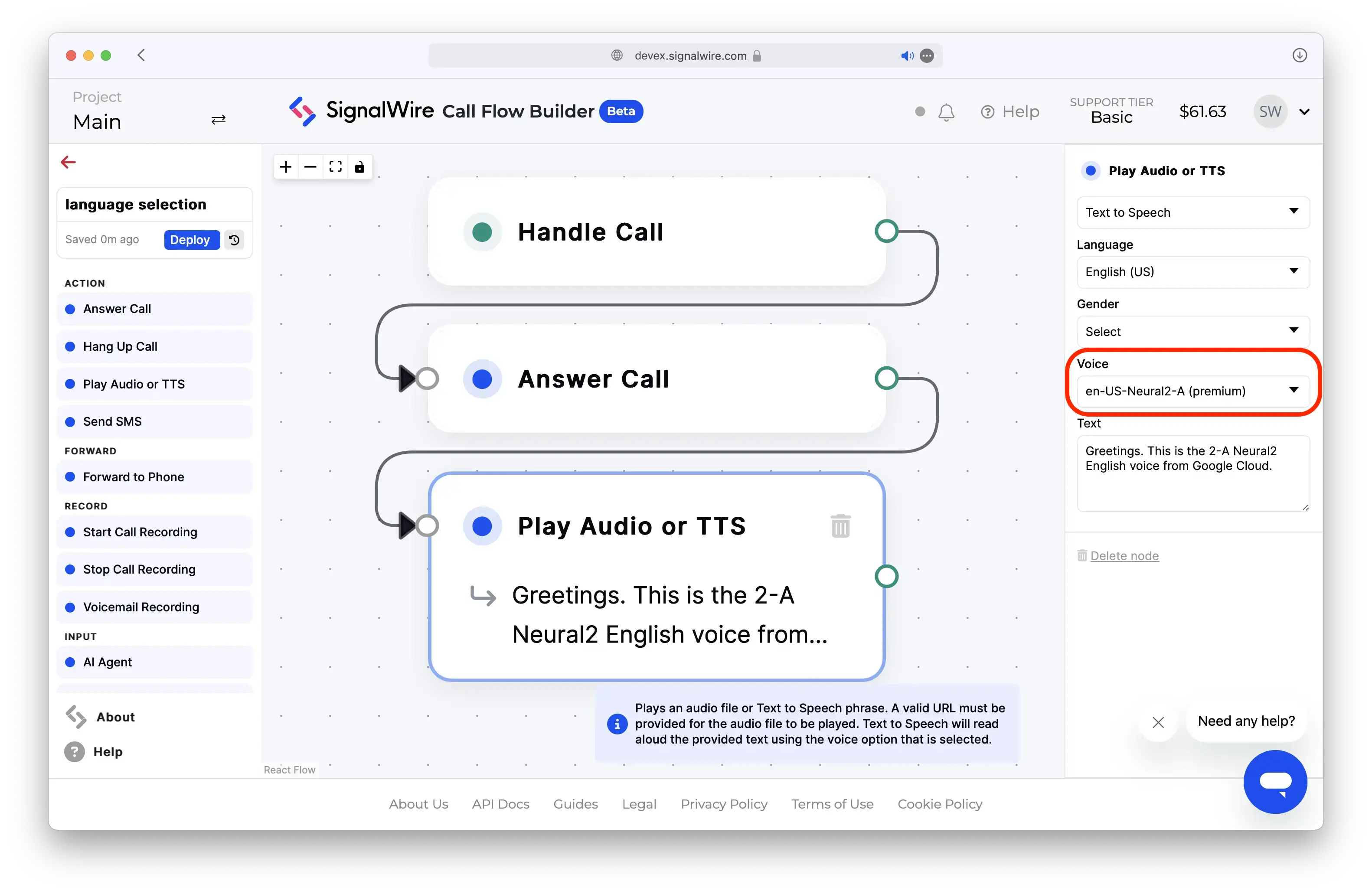
- Call Flow Builder
- cXML
Use the
languages
SWML method to set one or more voices for an AI agent.
version: 1.0.0
sections:
  main:
  - ai:
      prompt:
        text: Have an open-ended conversation about flowers.
      languages:
        - name: English
          code: en-US
          voice: gcloud.en-US-Neural2-A
Alternatively, use the say_voice parameter
of the play
SWML method to select a voice for basic TTS.
version: 1.0.0
sections:
  main:
  - set:
      say_voice: "gcloud.en-US-Neural2-A"
  - play: "say:Greetings. This is the 2-A US English voice from Google Cloud's Neural2 text-to-speech model."
// This example uses the Node.js SDK for SignalWire's RELAY Realtime API.
const playback = await call.playTTS({
    text: "Greetings. This is the 2-A US English voice from Google Cloud's Neural2 text-to-speech model.",
    voice: "gcloud.en-US-Neural2-A",
});
await playback.ended();
<?xml version="1.0" encoding="UTF-8"?>
<Response>
<Say voice="gcloud.en-US-Neural2-A">
    Greetings. This is the 2-A Neural2 English voice from Google Cloud.
</Say>
</Response>